
5 min read
What is the best brand of AC unit for my forever home
Choose the ideal AC for your forever home. Compare top brands, SEER2 ratings, and understand Best HVAC branding for trust.
Read more

March 30, 2026

Creating KPI reports is how business leaders turn raw numbers into clear, actionable decisions. If you need a quick answer on how to do it, here is the core process:
Too many businesses collect mountains of data but never convert it into decisions. KPI reports close that gap. They give your team a shared view of what is working, what is not, and where to focus next. Companies that build a culture around performance tracking are significantly more likely to outperform their competitors - one study found that figure to be as high as 4.2 times more likely.
Whether you run a growing home service company or manage a regional distributor network, reporting is not a back-office task. It is a strategic tool. A well-built KPI report does not just display data - it tells a story, surfaces problems early, and points toward the next right move.
I'm Jennifer Bagley, CEO of CI Web Group, and I have spent my career helping home service businesses build data-driven marketing systems that drive measurable, scalable growth - including creating KPI reports that connect marketing performance to real business outcomes. In the sections ahead, I will walk you through exactly how to build reports that work.
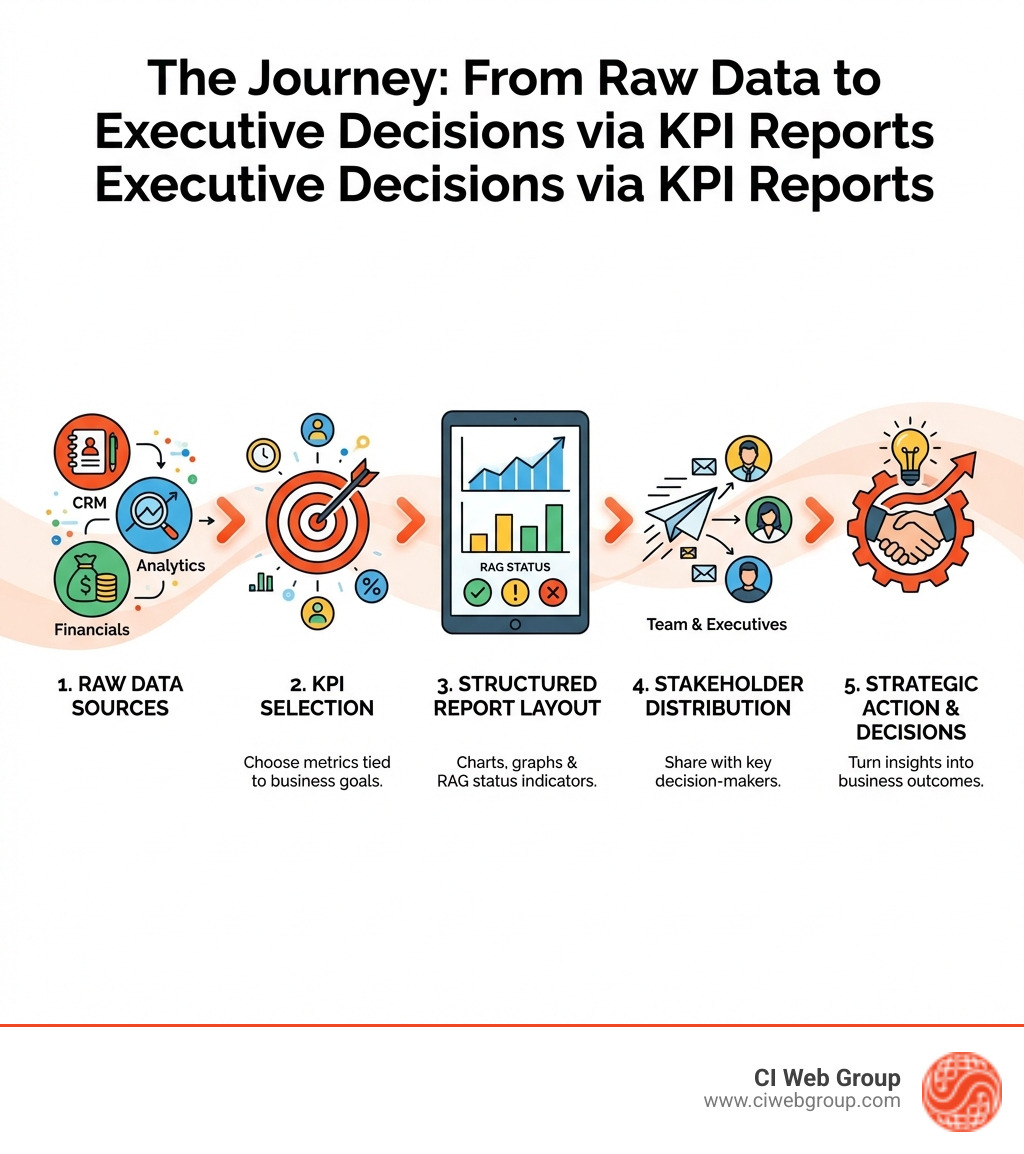
Creating kpi reports basics:
Before we dive into the "how," we must understand the "what." In our work with home service companies across Texas and the Pacific Northwest, we often see business owners drowning in data but starving for insights. The first step in creating kpi reports is distinguishing between the noise and the signals.
It is common to use these terms interchangeably, but they serve different purposes. A metric is any quantifiable measure of business activity. For example, the number of visitors to your website is a metric. It’s good to know, but it doesn't necessarily tell you if you’re winning.
A KPI (Key Performance Indicator) is a metric that is directly tied to a critical business objective. If your goal is to increase revenue by 20% this year, then "Conversion Rate of Leads to Sales" becomes a KPI. As the Association of National Advertisers found, the most common KPIs are often not the most important. The secret is to focus on what is "Key." For a deeper dive, check out The Metrics Every Leader Should Know.
To build a truly effective report, you should also understand KRAs (Key Result Areas). While KPIs are quantitative (numerical), KRAs are often qualitative or descriptive. They represent the "big picture" areas where a person or department must excel. For instance, a KRA might be "Customer Satisfaction," while the KPI used to measure it would be your Net Promoter Score (NPS).
This is where most people get stuck. Do you need a dashboard or a report?
| Feature | KPI Dashboard | KPI Report |
|---|---|---|
| Primary Purpose | Real-time operational monitoring | In-depth analytical interpretation |
| Timeframe | "Right now" or today | Historical trends (Monthly/Quarterly) |
| Depth | Visual at-a-glance status | Detailed analysis with commentary |
| Interactivity | High (filters, drill-downs) | Static (presented for review) |
| Action | Immediate tactical adjustments | Strategic planning and decision-making |
In short, use dashboards to keep the lights on and the team moving daily. Use reports to look back, identify why things happened, and decide where to invest your budget next month.
An effective report is more than just a PDF full of charts. It needs to be a persuasive document that argues for a specific course of action. When we assist contractors in Setting Up Marketing Dashboards for Contractors, we focus on these essential elements:
Ready to build? Follow these steps to move from a blank screen to a professional report.
A report for a service technician looks very different from a report for a CEO. Executives need high-level strategic data (ROI, total revenue), while managers need operational data (average ticket size, technician efficiency).
What is the goal of this report? Is it a Daily KPI Report to track sales, or a monthly marketing review? Once defined, gather data from reliable sources. Automation is your friend here; tools like ClearPoint can automate up to 70% of the reporting process, reducing human error.
Don't launch a perfect report on day one. Create a draft, show it to the stakeholders, and ask: "Does this help you make a decision?" If the answer is no, cut the fluff and try again.
When creating kpi reports, focus on a balance of leading and lagging indicators.
For our clients, we focus on Essential KPIs: Home Service Digital Marketing, such as:
Design matters. Cluttered reports turn into background noise.
Even the best intentions can lead to bad reports. Here is how to stay on track:
Avoid Information OverloadWhen everything is a priority, nothing is. One case study showed that sending executives 5 to 10 reports daily actually hindered decision-making. Stick to the "Vital Few" metrics.
Ensure Data AccuracyNothing kills a data-driven culture faster than a report that people don't trust. Coordinate with IT or your marketing partner to ensure data is pulling correctly from your CRM. If you're using AI, ensure you're using AI Marketing ROI Measurement tools that are properly calibrated.
The "Red" KPI ProtocolWhat happens when a KPI turns red? Don't panic. Use the 5 Whys or Pareto Analysis (the 80/20 rule) to find the root cause.
Automate DistributionDon't rely on someone remembering to "Send the report." Schedule automated emails or Slack alerts. This ensures consistency and keeps performance top-of-mind for the whole team.
A metric is any number you can track (like website hits). A KPI is a metric that is critical to your business success (like the conversion rate of those hits into paying customers). All KPIs are metrics, but not all metrics are KPIs.
It depends on the audience.
First, verify the data accuracy. If the data is correct, perform a root cause analysis. Identify whether the issue is external (market changes) or internal (sales process breakdown). Assign an owner to create an action plan and review progress weekly until the indicator returns to "Green."
Creating kpi reports is not just about looking in the rearview mirror; it’s about clearing the windshield so you can see the road ahead. In the competitive home services landscape—from the humid markets of Houston to the growing communities of the Southeast—the businesses that win are the ones that own their data.
At CI Web Group, we believe in complete transparency and client asset ownership. We don't just "do marketing"; we provide the reporting and strategy needed to ensure every dollar you spend is an investment in your company's future. Our customized programs are designed to help you dominate online search while providing the clarity of a corporate performance dashboard that tells you exactly where you stand.
Ready to stop guessing and start growing? Dominate your market with expert reporting and let us help you turn your data into your greatest competitive advantage.
Search our Blog
5 min read
What is the best brand of AC unit for my forever home
Choose the ideal AC for your forever home. Compare top brands, SEER2 ratings, and understand Best HVAC branding for trust.
Read more

5 min read
Get Your Phone Ringing: Google Ads Strategies for Plumbers
Master Google Ads for plumbers in 2026: Drive emergency leads, optimize campaigns & scale ROI in Dallas. Get your phone ringing now!
Read more

5 min read
The Beginner Guide to AdWords PPC Online Advertising
Master digital marketing google ads. Learn mechanics, optimize performance, choose campaigns, and boost ROI with this beginner's guide.
Read more

5 min read
Power Up Your Presence: Gilbert Custom HVAC Websites
Boost your Gilbert HVAC leads with custom website design. Mobile-first, SEO-optimized sites for local dominance and conversions.
Read more