
5 min read
HVAC Direct Mail Marketing Guide
Discover how HVAC direct mail helps contractors attract homeowners, boost response rates, and book more service calls with proven targeting and offers.
Read more

May 21, 2026
The best HVAC software solutions for service businesses in 2026 include platforms built for scheduling, dispatching, invoicing, preventive maintenance, and field operations. Here is a quick overview of what to look for:
Running an HVAC business without the right software is a bit like dispatching technicians without a map. Jobs slip through the cracks, paperwork piles up, billing lags behind, and your team spends more time chasing information than actually serving customers. The good news is that modern HVAC software solutions are built to solve exactly these problems, from the moment a customer calls to the second an invoice is paid.
Whether you run a residential service team, manage large commercial contracts, or oversee a fleet of technicians across multiple sites, the right platform can eliminate the operational chaos that quietly drains revenue every single day. This roundup breaks down the top tools available in 2026, what they do best, and how to match the right system to your specific business model.
I'm Jennifer Bagley, CEO of CI Web Group, and for over a decade I have helped HVAC contractors and home service companies use technology and HVAC software solutions to build more efficient, profitable, and scalable operations. The insights in this guide come directly from that work in the field.
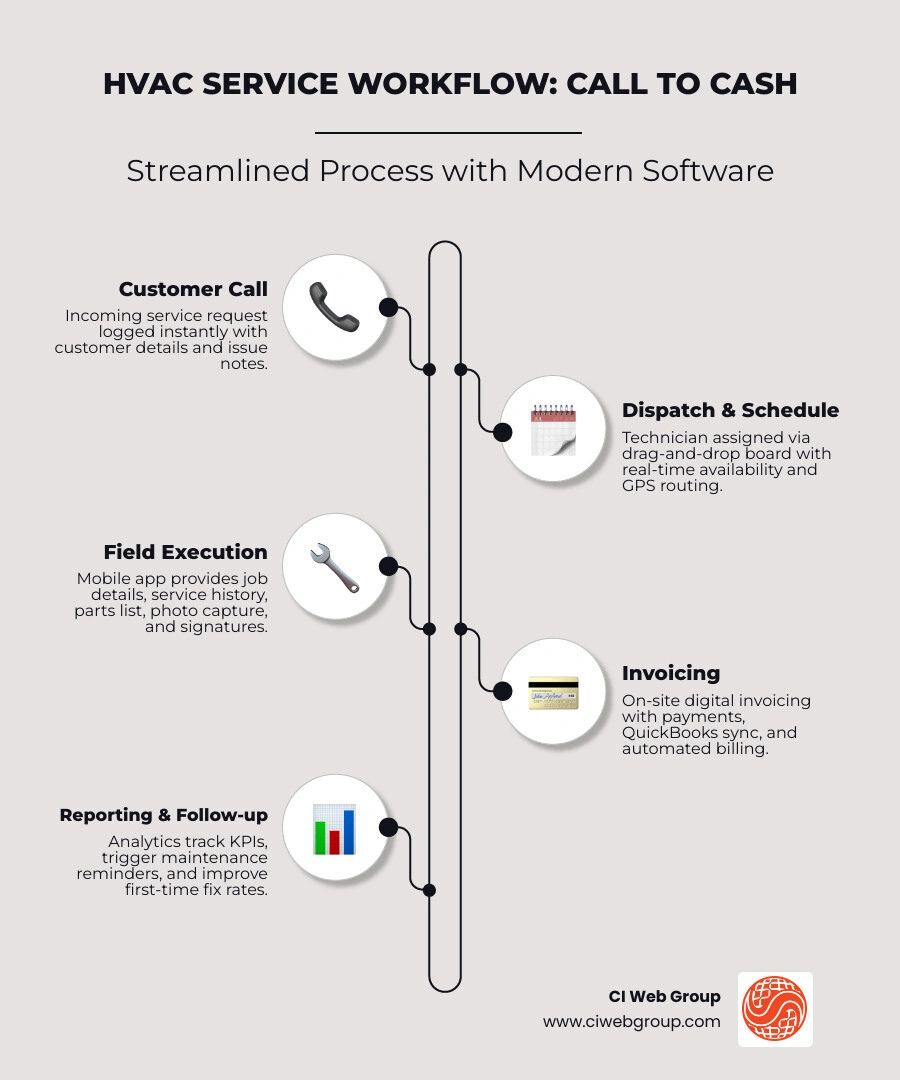
Explore more about HVAC software solutions:
At a practical level, HVAC software solutions help service businesses run fewer jobs with sticky notes and more jobs with real-time data. That means fewer phone calls asking, "Where is the tech?" and fewer end-of-day treasure hunts for paperwork.
Most HVAC platforms fall into two buckets:
Some systems blend both. The best fit depends on whether your operation is mostly service-call driven, maintenance-contract heavy, project based, or engineering focused.
Typical functions include:
HVAC field service management software has become essential because office and field teams can no longer afford to work from different versions of the truth. Dispatch needs live technician status. Techs need customer history and parts info. Owners need reporting that is not three weeks late and assembled from five spreadsheets.
A strong FSM platform gives you:
In other words, it replaces operational guesswork with operational control.
The most common HVAC pain points are not glamorous, but they are expensive:
When software fixes these issues, the gains stack up fast: fewer callbacks, faster invoices, better cash flow, and a calmer office. For businesses focused on visibility, our guide on Set Up Marketing Dashboards for Contractors pairs well with operational reporting improvements.
Not every platform that says "all-in-one" actually helps the whole team. Before you commit, make sure the system covers operations, financial flow, and compliance without making your technicians feel like they need a pilot's license.
For daily field use, these are the core features we recommend prioritizing:
These features matter because speed in HVAC is not just about driving faster. It is about reducing dead time between call intake, dispatch, diagnosis, approval, completion, and billing.
A platform should not stop at job completion. It should help turn work into cash quickly and accurately.
Look for:
Several platforms in the market now emphasize real-time financial visibility, invoice acceleration, and sync with accounting or ERP systems. That is a major advantage when you are trying to reduce manual entry and improve cash flow discipline. For more on measuring what matters, see Reporting Metrics for Home Service Success.
For many HVAC companies, the hidden value in software comes from maintenance and compliance discipline.
Important tools include:
These features help reduce missed maintenance, improve documentation, and support contract retention. If your business depends on recurring service revenue, these are not "nice to have" tools. They are the engine that keeps off-season cash flow from getting too sweaty.
Below is the simplest way to think about the 2026 landscape: choose by use case first, not by marketing promise.
| Use case | Best fit | What to prioritize |
|---|---|---|
| Residential service | FSM platform | Scheduling, dispatch, mobile invoicing, reminders, payments |
| Commercial service | Commercial FSM or integrated service platform | Asset history, PM contracts, job costing, ERP sync, reporting |
| Preventive maintenance | CMMS or PM-heavy platform | Asset management, inspections, recurring maintenance, uptime |
| Design and engineering | HVAC design software | Load calculations, duct layout, airflow modeling, equipment selection |
Residential HVAC teams usually need speed, simplicity, and strong customer communication. The ideal system supports:
This type of setup helps reduce office workload and keeps technicians productive in the field instead of waiting on callbacks from dispatch.
Commercial HVAC is a different animal. You are often managing mixed workloads across service, maintenance, retrofits, installs, and multi-site accounts. That means the software needs more depth.
Commercial priorities usually include:
Commercial teams also benefit from stronger documentation controls because handoff problems are common on larger jobs. If your operation includes project billing, complex maintenance agreements, or multiple decision-makers, make sure the system can support that complexity without forcing workarounds.
If your business lives on maintenance agreements, inspections, and asset uptime, a CMMS-style platform may be the better fit. These systems shine when you need to manage:
This is where platforms like Limble CMMS are often considered because they are designed around maintenance execution and recordkeeping rather than just call dispatch. For HVAC businesses with many assets under contract, that maintenance-first model can be a strong operational advantage.
Not all HVAC software is field service software. Design and engineering teams need tools that support:
These tools are especially useful for estimating, planning, and engineering-heavy workflows where precision matters before the first truck rolls.
The easiest way to choose well is to start with your operating model.
Residential HVAC usually centers on high-volume service calls, customer experience, maintenance plans, and quick payment. Commercial HVAC usually centers on asset intensity, contract obligations, multiple stakeholders, compliance, and deeper reporting.
Residential contractors should usually prioritize:
A smoother service experience also supports repeat business, online reviews, and maintenance renewals. That is why we often connect operational improvements to long-term retention strategy. If that is on your radar, read HVAC Customer Retention.
Commercial contractors should usually prioritize:
The larger and more complex the service environment, the more valuable reporting becomes. Commercial teams need clean data they can use to prove value, renew contracts, and improve operations. For that side of the business, Reporting Metrics for Home Service Success is worth a look.
As an HVAC operation grows, integrations become less optional and more survival related.
The most important ones often include:
Good integrations reduce double entry, improve data accuracy, and let teams make decisions faster. If you are reviewing your systems before a busy season, Prep CRM and Marketing Systems for Fall can help align operations and demand generation.
Choosing the software is only half the battle. The other half is implementation. A great platform with poor rollout will still create frustration, and frustrated teams always find a way back to spreadsheets.
During a software demo, ask practical questions, not just feature questions:
If a demo looks shiny but cannot answer these questions clearly, keep digging.
A good first 90 days should focus on adoption, clean data, and measurable wins.
Rollout milestones usually include:
The goal is not perfection on day one. The goal is momentum with fewer dropped handoffs.
The best HVAC software does more than organize dispatch. It supports growth.
It can help with:
Some platforms also support integrated financing or proposal workflows that help close work faster in the field. When the operational side tightens up, sales leakage often drops too. That is closely related to what we cover in The Sales Supply Chain: Stop Hidden Revenue Leaks in Home Service Businesses and Essential KPIs for Home Service Digital Marketing.
HVAC FSM software is built around field service delivery: scheduling, dispatching, work orders, mobile invoicing, and technician coordination.
CMMS is built around maintenance management: asset records, preventive maintenance schedules, inspections, compliance, and uptime tracking.
If your operation is service-call heavy, FSM usually leads. If your operation is maintenance-contract and asset heavy, CMMS may be the better primary system.
It improves cash flow by helping teams invoice faster, collect payments in the field, reduce double entry, and sync financial data more cleanly.
It improves technician productivity by giving techs mobile access to service history, parts info, work orders, and customer notes. That reduces callbacks, phone tag, and wasted drive time. Some providers in the market also report major productivity gains from mobile-first workflows, which tracks with what we see in the field.
Avoid:
If your team hates the software, your process will eventually hate you back.
The right HVAC software solutions can tighten operations, improve cash flow, support preventive maintenance, and give your team the visibility it needs to scale with less chaos. But software alone is not the full growth strategy. Once your systems are connected, your marketing, reporting, retention, and branding need to work just as hard.
That is where we come in. At CI Web Group, we help HVAC businesses connect digital operations with stronger demand generation, smarter automation, and better visibility across the customer journey.
To keep building on this foundation, explore:
When your software, service workflows, and marketing all pull in the same direction, growth gets a lot less manual and a lot more predictable. And honestly, that is the kind of tech we do not mind sweating over.
Search our Blog
5 min read
Don't Sweat the Tech with These Software Solutions
Discover top HVAC software solutions for 2026. Streamline scheduling, dispatching, invoicing & more to boost efficiency & cash flow.
Read more
5 min read
HVAC Direct Mail Marketing Guide
Discover how HVAC direct mail helps contractors attract homeowners, boost response rates, and book more service calls with proven targeting and offers.
Read more
5 min read
Unlocking Efficiency: A Guide to AI-Powered Web Design Services
Discover AI web design services: top tools, workflows, benefits for home services, and 2026 trends for efficient, SEO-optimized sites.
Read more

5 min read
Your Go-To Resource for All Things Plumbing Store Related
Discover everything about plumbing supply. Find products, repair parts, and pro tips for your next project or business growth. Your ultimate guide.
Read more